

This is going to be a series of articles in which we are going to create a web application from scratch. With this series of articles, the intention is to generate knowledge in the following areas of development with React:
- How can we create a web application with React easily?
- How do we structure those components in React?
- How do we style those components?
- How do we connect our application with an external API?
- How can we maintain a global state in our application, without requiring an external library?
- How can we write tests for this application?
In this first part we are going to create the basic components, create some style sheets, use PostCSS with Tailwind.
#.Where do we get the information on the breeds and photos?
For this, we are going to use Dog API, which is an open API with a fantastic collection of dog photos.
You can read the API page for more information.
#.Creating the base structure of the application
We are going to use Create React App to generate the base structure of our application. For this, we are going to execute the following command:
npx create-react-app fotos-perritosIf you don’t have Create React App available, the command will first ask you if you want to install it.
Once the base structure of the application has been generated, we are going to enter the application folder and we are going to install the dependencies, in my case I will use yarn:
yarn#.Styling the application
To stylize the application, without so much hassle, we are going to use Tailwind CSS. For this, we are going to install the Tailwind CSS dependencies and start the base Tailwind configuration:
yarn add -D tailwindcss@latest postcss@latest autoprefixer@latest
// ...
npx tailwindcss init -p
This will create a file tailwind.config.js in the root of our project. In this file, let’s make sure that the content property is mapping the js,jsx files of our application:
module.exports = {
  content: [    "./src/**/*.{js,jsx}",  ],  theme: {
    extend: {},
  },
  plugins: [],
}
Finally, we go to our index.css file, we delete everything it already contains and we are going to import Tailwind CSS:
@tailwind base;
@tailwind components;
@tailwind utilities;#.Changing the base structure of the application
We are going to change the base structure of our App.js file, so that we have a simple idea of what we want to do. For this, we open the src/App.js file and modify it to the following:
import "./App.css";

function App() {
  return (
    <div className="container mx-auto mt-8 flex flex-col gap-3">
      <h1 className="text-2xl">Fotos Aleatorias de Perritos</h1>
      <h2 className="text-xl">
        Escoge una raza de perritos y te desplegaremos una fotografía aleatoria
      </h2>

      <section>
        <form action="#">
          <select
            name="breed"
            id="breed"
            className="p-2 text-sm text-gray-900 border border-gray-300 rounded-lg bg-gray-50 focus:ring-blue-500 focus:border-blue-500"
          >
            <option selected>Seleccionar</option>
            <option value="Raza 1">Raza 1</option>
          </select>
        </form>
      </section>
    </div>
  );
}

export default App;
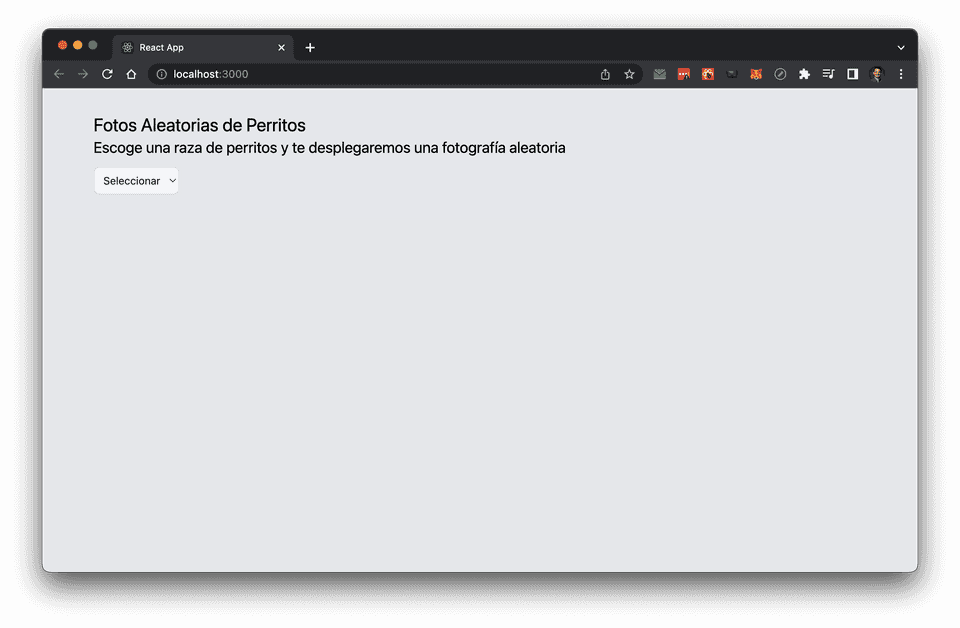
We can delete all the content within App.css, since we are not going to use it. For now, the app will only display a title (h1), a subtitle (h2), and a select with a default base option.
#.Structuring into multiple components
For now, everything resides within App.js, but we are going to change this. The reason for this is that we should try to have our components perform a single task or function (Single Responsibility Principle). We will apply the same principle also for any function we create.
This will also help us a lot when testing our components and when maintaining them.
The base structure should look like this:
<App>
  <Titulos />
  <Formulario>
    <Select />
  </Formulario>
</App>
Let’s create the Title.js and Form.js components inside the src/components folder:
import React from "react";

const Title = () => {
  return (
    <section>
      <h1 className="text-2xl">Fotos Aleatorias de Perritos</h1>
      <h2 className="text-xl">
        Escoge una raza de perritos y te desplegaremos una fotografía aleatoria
      </h2>
    </section>
  );
};

export default Title;import React from "react";
const Form = () => {
return (
<section>
<form action="#">
<select
name="breed"
id="breed"
className="p-2 text-sm text-gray-900 border border-gray-300 rounded-lg bg-gray-50 focus:ring-blue-500 focus:border-blue-500"
defaultValue={null}
>
<option>Seleccionar</option>
<option value="Raza 1">Raza 1</option>
</select>
</form>
</section>
);
};
export default Form;And finally, we are going to modify the App.js so that it uses these components:
import "./App.css";
import Form from "./components/Form";
import Title from "./components/Title";

function App() {
  return (
    <div className="container mx-auto mt-8 flex flex-col gap-3">
      <Title />
      <Form/>
    </div>
  );
}

export default App;
If we run our application, using yarn start, we will see the following:
#.Correcting those imports
Those relative imports look a bit ugly, let’s fix them before this gets worse. For this, we are going to create a file jsconfig.json in the root of our project:
{
  "compilerOptions": {
    "baseUrl": "src"
  },
  "include": ["src"]
}
What this tells our project is that, when we import a file, it should not look for it in the src folder, but rather look for it in the root of the project.
Now we can change the two imports in our App.js file:
// ...
import Form from "components/Form";import Title from "components/Title";
function App() {
  // ...
If we run our project again, everything should continue to work the same.
#.Removing plain text within our code
We have plain text within our application, we are going to write tests against that same text and we should really avoid having that text within our code (imagine that later you want to change a text, you want to bring that text in a different language, etc).
To do this, for each component we are going to create a file in .json format with the same name as the component. For example, for component Title.js, we will create a file Title.constants.json:
{
  "title": "Fotos Aleatorias de Perritos",
  "subtitle": "Escoge una raza de perritos y te desplegaremos una fotografía aleatoria"
}
And a file Form.constants.json:
{
  "form": {
    "defaultOption": "Seleccionar"
  }
}
Now, in each of our components, we are going to import the corresponding file and we are going to use the values we need:
import React from "react";
import CONSTANTS from "./Title.constants.json";

const Title = () => {
  return (
    <section>
      <h1 className="text-2xl">{CONSTANTS.title}</h1>
      <h2 className="text-xl">{CONSTANTS.subtitle}</h2>
    </section>
  );
};

export default Title;import React from "react";
import CONSTANTS from "./Form.constants.json";
const Form = () => {
return (
<section>
<form action="#">
<select
name="breed"
id="breed"
className="p-2 text-sm text-gray-900 border border-gray-300 rounded-lg bg-gray-50 focus:ring-blue-500 focus:border-blue-500"
defaultValue={null}
>
<option>{CONSTANTS.form.defaultOption}</option>
<option value="Raza 1">Raza 1</option>
</select>
</form>
</section>
);
};
export default Form;#.Testing these components
Now we are going to test these components, an essential part when writing our systems. Create React App is already configured to be able to run tests, for this we are going to run the tests (and see them fail) with the following command:
yarn test

...

Test Suites: 1 failed, 1 total
Tests:       1 failed, 1 total
Snapshots:   0 total
Time:        4.072 s
Ran all test suites related to changed files.
If we go to the file App.test.js, we will see that we have a test that fails. This test uses Jest with React Testing Library. We are going to correct this test so that it passes, but first we must ask ourselves what we should test. In my opinion we must ensure that:
- The component renders correctly.
- The component has a title, with the expected value.
- The component has a subtitle, with the expected value.
- The component has a
<select>, with the default value.
So let’s write the foundation for these tests. We delete the existing test content and start creating our tests.
describe("App", () => {
  it("should render", () => {
  });
})
Since we are using the same Single Responsibility Principle, we are going to separate the tests into different tests. This means that:
- The
App.js, we must ensure that:- Render the title component and the form.
- The
Form.jsrenders the elements that correspond to it, in this case the form with its<select>. Title.jsrenders both the title and subtitle.
So we will end up with 3 test files, the first being App.test.js:
import { render, screen } from '@testing-library/react';
import App from './App';
import TITLE_CONSTANTS from 'components/Title.constants.json';
import FORM_CONSTANTS from 'components/Form.constants.json';

describe("App", () => {
  it("should render", () => {
    render(<App />);

    expect(screen.getByText(TITLE_CONSTANTS.title)).toBeInTheDocument();
    expect(screen.getByText(FORM_CONSTANTS.form.defaultOption)).toBeInTheDocument();
  });
});
Here we can see that we are using the constants we created earlier to ensure that the text we are looking for is present in the DOM. We run our tests with yarn test and now we see:
 PASS  src/App.test.js
  App
    ✓ should render (41 ms)

Test Suites: 1 passed, 1 total
Tests:       1 passed, 1 total
Snapshots:   0 total
Time:        4.771 s
Ran all test suites related to changed files.

Watch Usage: Press w to show more.
Now let’s create the file Title.test.js:
import { render, screen } from '@testing-library/react';
import Title from './Title';
import CONSTANTS from './Title.constants.json';

describe("Title", () => {
  it("renders the title", () => {
    render(<Title />);

    expect(screen.getByText(CONSTANTS.title)).toBeInTheDocument();
  });

  it("renders the subtitle", () => {
    render(<Title />);

    expect(screen.getByText(CONSTANTS.subtitle)).toBeInTheDocument();
  });
});
And then the file Form.test.js:
import { render, screen } from '@testing-library/react';
import Form from './Form';
import CONSTANTS from './Form.constants.json';

describe("Form", () => {
  it("renders the default option", () => {
    render(<Form />);

    expect(screen.getByText(CONSTANTS.form.defaultOption)).toBeInTheDocument();
  });
});
And when running the tests:
 PASS  src/components/Title.test.js
 PASS  src/App.test.js
 PASS  src/components/Form.test.js

Test Suites: 3 passed, 3 total
Tests:       4 passed, 4 total
Snapshots:   0 total
Time:        5.423 s
Ran all test suites related to changed files.

Watch Usage: Press w to show more.#.Another way to test the structure
Another way to test the structure, for example of the Title.js component, is using Snapshot Testing.
This is useful when we want to ensure that our component has the structure we are expecting and that it does not change inadvertently.
To do this, we must first configure Babel so that it can compile the React code. To do this we are going to install the following dependencies. Since Create React App already uses Babel, we just need to configure it by adding a .babelrc file in the project root:
{
  "env": {
    "test": { "presets": ["react-app"] }
  }
}
Then we can add the following tests in Form.test.js:
import { render, screen } from '@testing-library/react';
import Form from './Form';
import CONSTANTS from './Form.constants.json';

describe("Form", () => {
  it("renders the default option", () => {
    render(<Form />);

    expect(screen.getByText(CONSTANTS.form.defaultOption)).toBeInTheDocument();
  });

  it("renders the markup as expected", () => {    const { container } = render(<Form />);    expect(container).toMatchSnapshot();  });});
What this will do is create a __snapshots__/Form.test.js.snap file with the structure of our component at the time the expect(container).toMatchSnapshot(); line is executed.
⚠️ If the component structure changes suddenly, the test will fail and show us the difference between the current structure and the expected one.
#.Clarification when writing tests
In this short tutorial I have written the functionality first and then the tests. This may be considered bad practice.Ideally, we should write our tests first and then write the functionality (although in practice, after 10+ years writing code, I rarely see this 🤣). This will help us think about the functionality we want our component to have and then write the code that makes it possible.
#.Recommendations on testing with snapshots
One detail that I think is appropriate to mention about snapshots is that if the component has a dynamic value, for example, a id or a key, the snapshot will fail because the value will be different each time the test is executed. To avoid this, we can use the jest.mock() function so that the value is always the same. The same thing happens if we use something like a date. This means that our tests must be deterministic.
Likewise, I think it is appropriate to mention that snapshots_ should be treated as code. My point here is that we should use our judgment to determine if a snapshot is extremely complex to parse, and if so, we should replace it with a simpler test.
Both recommendations are mentioned in the original Jest guide in its Best Practices section.
Basically: snapshots can be your ally or your enemy, you choose.
#.Next steps
In the next tutorial we are going to change the form component, the Form.js and we will:
- Connect the API.
- Create a centralized way to manage the state of the application, without using any external library.
- Test our API and our integration with the state manager.
- We are going to explore some recommendations when using React Testing Library, since at first it can be a little confusing on how we should write these tests, especially if we are used to writing unit tests.